Structural elements include beams too.
Beams can be placed in the wall, from which point they will form a structural element with the wall.
You can place it on the active floor or on the terrain.
The length of the beam must be specified at the time of placement. The length field in the dialog box only has a role when modifying: it indicates the actual length of the beam, or you can modify the length by entering a value.
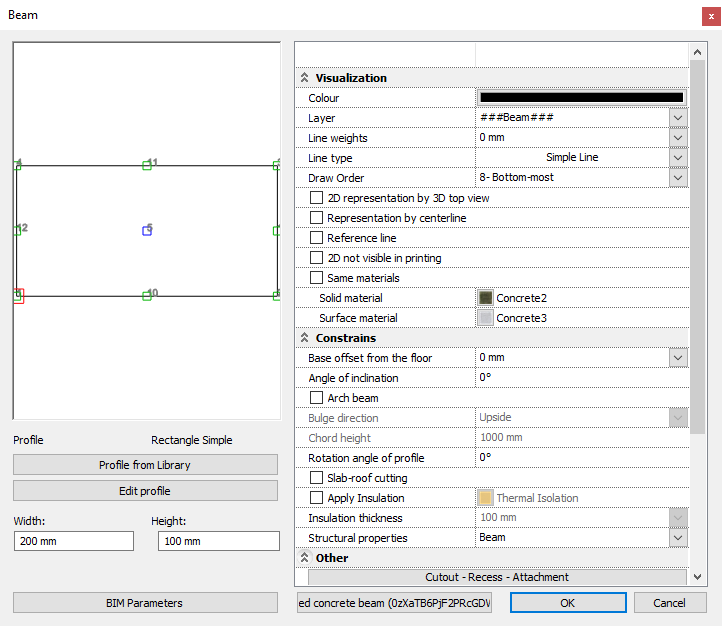
Beam properties can be specified in the Building menu - Properties - Beam dialog.
The structure of the dialog is very similar to the Column Properties dialog.
The Beam Tool - Beam Properties command displays essentially the same dialog box as the Column Properties.
The difference is due to the use of the beam as a support element.
They cannot be found:
- hatching
- inclination
- rotation.
On the contrary, it also has the following options:
Drawing display options
Display with centre line
Beam display can be specified with the centerline only.
Other parameters
Beam with circular curve
With this option you can create a circular arched beam by specifying the direction of the bulge (left/right/up/down) and the string height. For a circular arch beam, the length of the beam is always the length of the straight section defined by the start and end points of the beam.
Centre of gravity
The program displays the beam's centreline.

Representation in column centroid points
Position a beam with its start and end points so that it spans several support columns. If this option is checked, the program splits the beam into interconnected sections.


Note: It is important that the beam fits on the columns.
Alignment of ends in a chain is allowed
Enable this option if you want to align the ends of beams in a chain.
The end of a beam with an aligned end can be changed to unaligned, but if alignment is not turned on beforehand, the end cannot be changed afterwards.
Comments
0 comments
Article is closed for comments.